Open source · free pilot
Measure agents on your site.
Your analytics counts people. It does not see the visitor ChatGPT sent, the page ClaudeBot fetched, or the WebMCP tool an assistant called inside the browser. One line of script does, and shows it in four views.
Sign in by email, paste one line, done. No card, no cookies on your visitors, no personal data. See the demo page first if you like.
AI agent analytics for websites
What Agent Tracking does
Agent Tracking is AI agent analytics for websites: it records which AI assistants send visitors, which AI crawlers and live fetchers read pages, which MCP and WebMCP tools an agent calls inside the browser, and whether the agent reaches a goal.
Web analytics counts people. Bot managers count crawlers at the edge. Neither sees the agent that is already inside the site, calling a tool or finishing a booking on someone's behalf. Agent Tracking measures that third kind of visitor, from the referral to the completed action, with one line of script, without cookies and without personal data.
What it is not
The name is used for five other things. None of them is this. If a search engine or an assistant sent you here for one of those, this is the wrong page, and here is where the right one lives.
Not agent observability
AgentOps, LangSmith, Langfuse, OpenTelemetry for LLM apps
Those trace the agents you build, from inside your own code: spans, prompts, token cost. Agent Tracking measures agents other people run when they visit your website, from the outside, with a script tag. The two are complementary; a team can use both.
Not workforce tracking
Call-centre or support agents
No schedule adherence, handle time, idle time or ticket counts of human employees. The word agent here means a piece of software acting for a person.
Not field tracking
Sales reps, couriers, GPS check-ins
No location, no route, no visit duration of any person. Nothing here knows where anyone is.
Not parcel tracking
Air waybills, shipments, delivery agents
Not a package lookup and not connected to any carrier.
Not mobile agents
The distributed-computing sense
Not a mechanism for forwarding or locating migrating code across hosts.
Not a bot blocker
No CAPTCHA, no firewall, no rate limit on your visitors
It measures and never blocks. The only request it makes to your site is one fetch of the homepage to verify the snippet.
What it sees
Five layers, from the first click to the finished job. Each one comes from a source you can check.
AI referrals
Who sends visitors
A visit from chatgpt.com, perplexity.ai, claude.ai, copilot.microsoft.com, gemini.google.com and a dozen more is attributed to the assistant, from the referrer and utm_source, matched against a published, versioned list.
AI fetches
Who reads your pages
GPTBot, ClaudeBot, PerplexityBot, OAI-SearchBot, Google-Extended, Applebot-Extended, Bytespider and the rest. Agents that run JavaScript are seen by the snippet; the others come from your server log, each line verified against the vendor's published IP ranges, and grouped into fetch bursts: one agent, many pages, a few seconds, which is what a query fan-out looks like from your side.
Tool calls
What they do with your tools
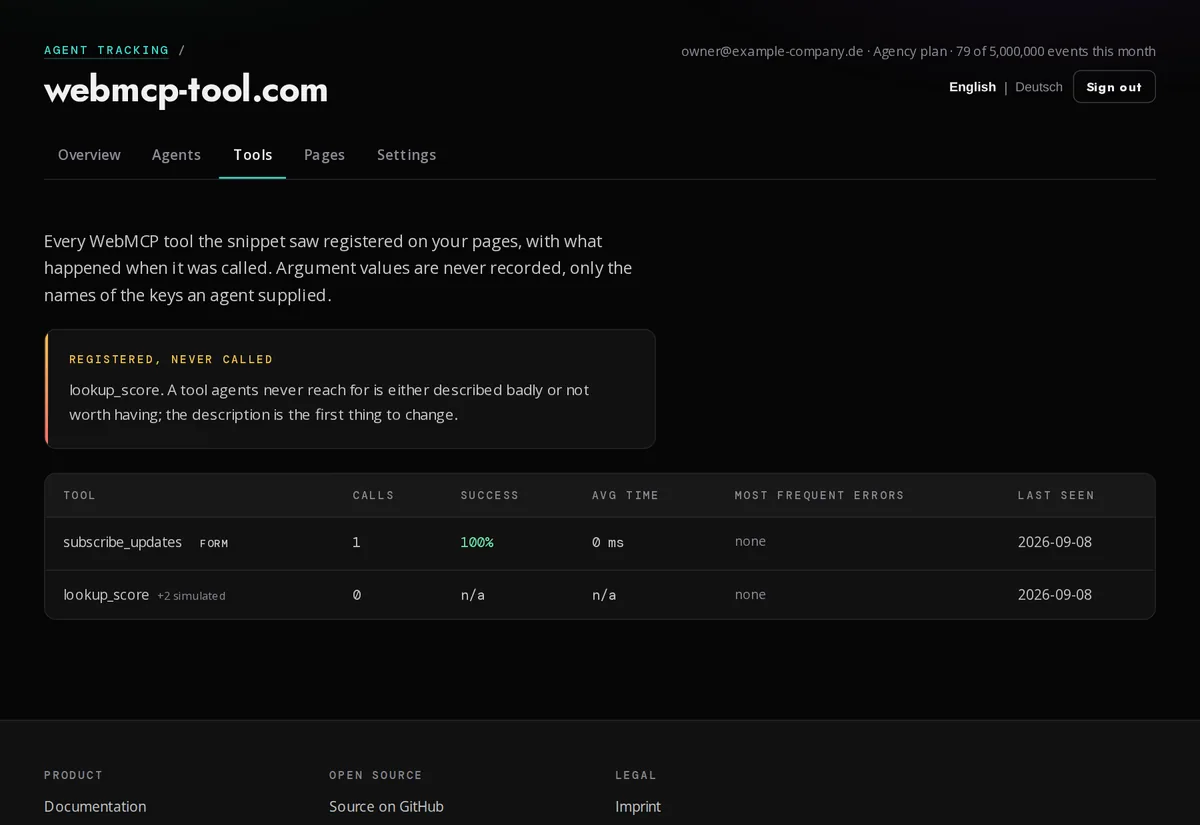
Every MCP and WebMCP tool on the site: calls, duration, success rate, error classes, the names of the input keys, and the tools no agent has ever called. The snippet wraps navigator.modelContext and watches declarative forms; nothing in your code changes.
Conversions
Whether they finish
Mark a booking, an order or a signup with data-agent-goal and see the conversion rate of agents, separately from people.
Manifest
When your tool list changes
The manifest at /.well-known/webmcp is hashed once per visit. The dashboard shows when it last changed; Pro accounts are alerted by email.
Score
Beside the numbers stands the site's Agent Readiness Score from webmcp-tool.com: how well the site can be used by agents, next to how much it actually is. webmcp-tool.com
Win the fight for AI bot traffic
Agents already decide which sites get cited, read and used. Most sites have no idea what agents do on them. The one that knows can improve; the rest guess. Four steps, repeated.
1. Measure
Every agent, every action
Referrals, verified fetches, bursts, tool calls, goals. Not sampled, not estimated: the actual events, with the agent named.
2. Understand
Study how MCP and WebMCP agents behave
Which pages a crawler takes, in which order and how fast. Which tool an assistant tries first, where it fails, which argument keys it sends, whether it reaches the goal or gives up.
3. Fix
Change the site, the tools, the manifest
Rename the tool the agent keeps missing. Fix the error class that fails half the calls. Open the page every fan-out lands on. Publish the manifest agents look for.
4. Verify
Readiness score and real usage, side by side
The score from webmcp-tool.com says whether agents can use the site. The numbers say whether they do. When both go up, you are winning.
Who it is for
Anyone whose site is read, cited or operated by AI agents, which today is every site that ranks.
Marketing and GEO
Teams working on AI visibility
Know which assistants send visitors and which pages they cite, week over week. The number your generative engine optimisation was missing.
Developers
Teams publishing MCP and WebMCP tools
Production analytics for your tools: calls, success rate, duration, errors, the tools nobody uses. The only place this exists.
Agencies
Many client sites, one account
Unlimited sites on the Agency plan, a public stats page per client, a white-label badge, one API token for your own reporting.
European companies
Data protection first
No consent banner, no transfer, a DPA on adding the site, hosting in Germany, or your own server. The dashboard your DPO signs off.
Ask your agent, not a dashboard
Every number is an MCP tool. Point the agent you already use at it and ask in words. Claude, ChatGPT, Cursor, Codex, Hermes, OpenClaw: anything that speaks MCP, or a script with curl.
Claude
Claude Desktop and Claude Code
Add the MCP server with your token and ask: which agents read our site this week, and which tool failed most?
ChatGPT
Connectors and custom GPTs
The same endpoint as a connector, and your GPT answers from your own agent data.
Cursor, Codex, Hermes, OpenClaw
Any MCP client, in the terminal or a workflow
One JSON block in the client config. The agent that writes your code can read how agents use the result.
Scripts and BI
JSON, CSV, weekly digest
GET /api/stats for dashboards and notebooks, CSV export for spreadsheets, a Monday mail with the week's numbers for people who read mail.
{
"mcpServers": {
"agent-tracking": {
"url": "https://agenttracking.co/api/mcp",
"headers": { "Authorization": "Bearer wmt_your_token" }
}
}
}- “Which agents read our site this week, and which pages did they take?”
- “Which of our WebMCP tools has the worst success rate, and what is the top error?”
- “Did any fetch burst look like a Perplexity fan-out on the pricing page?”
- “How many agent conversions did we have in the last 30 days, compared to the 30 before?”
Why it is different
Every tool on the market measures people or crawlers. The layer in between, where an agent uses the site, is the one nobody measured. Categories rather than vendor names, because products change; check any one of them against the rows.
| Agent Tracking | Web analytics | CDN bot audit | Log analyzer | AI referral SaaS | |
|---|---|---|---|---|---|
| AI referrals attributed to the assistant | yes | partly | no | no | yes |
| Crawler fetches verified against vendor IP ranges | yes | no | yes | partly | no |
| Fetch bursts (query fan-outs) | yes | no | no | no | no |
| MCP and WebMCP tool calls with success, errors, duration | yes | no | no | no | no |
| Agent conversions (goals reached by agents) | yes | no | no | no | no |
| Manifest change alerts | yes | no | no | no | no |
| Readiness score beside the usage | yes | no | no | no | no |
| Works without a CDN or proxy in front of the site | yes | yes | no | yes | yes |
| No cookies, no IP stored, no consent banner | yes | some | n/a | no | rarely |
| Data stays in the EU | yes, server in Germany | depends | no | yes | no |
| Numbers as JSON and as an MCP tool | yes | API only | no | no | API only |
| Open source, self-hostable, one file to back up | yes | some | no | yes | no |
The middle five rows are the ones you will not find elsewhere.
Built for European companies and professionals
Usable by a company that has a data protection officer, a works council and a lawyer, without a consent banner and without a transfer to think about.
GDPR by construction
Not by banner
No cookies, nothing on the device, no network address stored, no fingerprint. The session id is a hash of a value that changes every day, so yesterday's rows cannot be linked to today's. Tool arguments are recorded as key names, never values. Raw events are deleted after 90 days.
Hosted in Germany
With a DPA you conclude by adding a site
The data processing agreement names the sub-processors, includes the EU standard contractual clauses and describes the processing exactly as the code does it. Your data protection officer can read the source.
Two languages
Dashboard, docs and legal pages
English and German throughout, English binding. Support in both.
Self-hostable
When data must not leave your house
One Node process, one SQLite file, AGPL-3.0, ten minutes with Docker. What the cloud does, your server does.
The concrete value
Six questions the dashboard answers that nothing else on your site can.
Channels
Who sends you business
"Perplexity referred 40 visitors this week, ChatGPT 12, and they land on the pricing page." A channel you can now optimise, and a number for whoever asks whether AI matters for your site.
Readers
Who reads you, and what they take
GPTBot fetching 400 pages a night is training. ChatGPT-User fetching 3 pages in 4 seconds is a person asking about you right now. The Agents view tells them apart; the bursts tell you which question.
Tools
Whether your tools work for agents
You published MCP or WebMCP tools. Are they called? Do they fail? Which error? How long do they take? Which ones has no agent ever touched? This view is the only place that exists.
Goals
Whether agents finish
A tool call is not a sale. Mark the goal and see the conversion rate of agents, separately from people.
Monitoring
What machines do to your site
Verified fetches, impostors claiming to be a known bot, bursts, manifest changes: the operational picture of non-human behaviour, every day, in one place.
Your agents
The numbers in your own tools
A bearer token and one MCP tool, and Claude, ChatGPT or Cursor answer "which agents read our site this week?" from your data.
Four views, nothing else
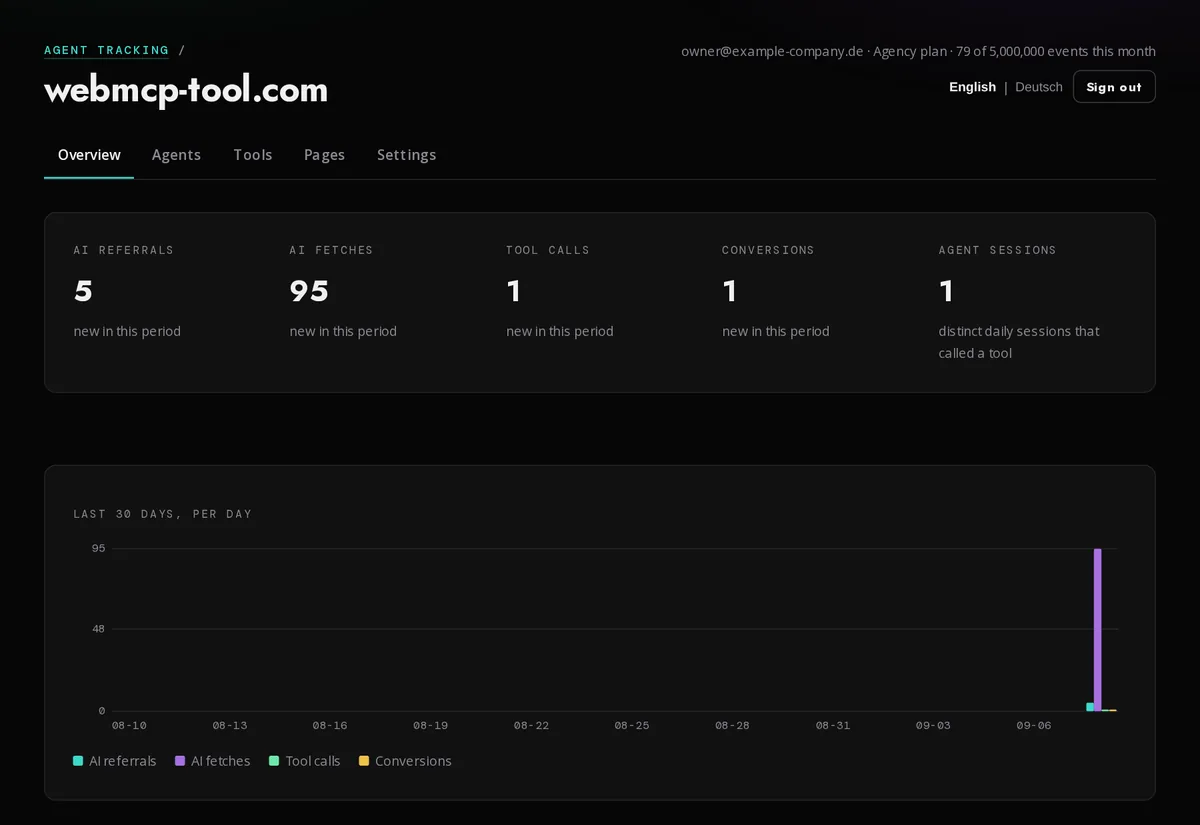
Overview, Agents, Tools, Pages. Each one answers a question you would otherwise have to guess at. The screenshots below come from our demo page with test data, which is why the numbers are small; they are not a customer's.


One line, then wait for the first agent
Add your site in the dashboard, put this on every page, and press verify. Tools you register through navigator.modelContext are picked up without any change to your code; declarative tools are forms with a toolname.
<script defer data-domain="example.com" src="https://agenttracking.co/agent.js"></script>No cookies, nothing written to the visitor's device, no network address stored, and for tool calls the names of the input keys but never their values. Raw events are deleted after 90 days; daily totals stay as long as the site does. Everything lives on our own server in Germany, and the data processing agreement is concluded the moment you add a site. Removing the site deletes all of it.
Cloud or your own server
The whole product is open source under AGPL-3.0: the snippet, the ingest, the dashboard, the log import, the cron jobs. Run it on your own machine with one compose file, or use the hosted version here and let us run it.
Cloud · Free
Free during the pilot
1 site, 10,000 agent events a month, 30 days of history. Plain page views are not counted. No card.
Cloud · Pro and Agency
Not open yet
5 sites and 500,000 events with manifest alerts, or unlimited sites with a white-label badge. Prices follow when the product has earned them; until then write to us and we switch your account by hand.
Self-hosted · Free
Your server, your data
Every plan limit is yours to set. One Node process, one SQLite file, no external service except a mail sender. Source and instructions on GitHub.
git clone https://github.com/shufflethis/agent-tracking.git && cd agent-tracking cp .env.example .env && docker compose up -d
Free during the pilot
Agent Tracking is new, and the honest way to price something new is to run it first. During the pilot every account is on the Free plan: 1 site, 10,000 agent events a month, 30 days of history. Plain page views are not counted.
Need more than that while the pilot runs? Write to hi@finalmaster.net and we switch your account by hand. Paid plans follow when the product has earned them, and nothing about your account changes without 30 days' notice by email.
What we ask in return: tell us what the dashboard got wrong, which agent it missed, which number you did not believe. That is what the pilot is for.
Questions people ask
Short answers. The documentation has the long ones. Read the documentation. Guides, one question each. Source on GitHub.
What is Agent Tracking?
Agent Tracking is an open-source analytics service that measures what AI agents do on a website: AI referrals, AI crawler fetches verified against published IP ranges, MCP and WebMCP tool calls with their outcome, and conversions reached by agents. It is installed with one script tag and stores no cookies and no personal data. Its category is AI agent analytics for websites.
Is this the same as AgentOps, LangSmith or LLM observability?
No. Observability tools trace the agents you build, from inside your code. Agent Tracking measures agents that other people run when they visit your website, from the outside, through a script tag on your pages. It does not see prompts, spans or token costs, and it needs no SDK. The two complement each other.
Does it track call-centre agents, field staff or parcels?
No. Agent here means software acting for a person: ChatGPT, Claude, Perplexity, a crawler, a WebMCP-capable browser. Nothing in the product records people, locations, shifts or shipments.
How is it different from Google Analytics or Plausible?
Web analytics counts people and their pages. Agent Tracking counts agents and their actions: which assistant sent the visitor, which crawler read which pages, which tool an agent called and whether it succeeded. It runs beside your analytics, not instead of it.
How is it different from Cloudflare AI Audit or a bot manager?
A bot manager sees crawlers at the edge and needs to sit in front of your site. Agent Tracking sees referrals, fetches and tool calls inside the page, needs no CDN, verifies crawlers against vendor IP ranges from your own log, and measures whether agents reach a goal.
Do I need a cookie banner for it?
No. The snippet sets no cookie, writes nothing to the device, stores no network address and builds no fingerprint. The session id is a hash of a daily random value. Consent under ePrivacy is for storage on the device, and there is none.
Where is the data stored?
On a server in Germany. A data processing agreement with the EU standard contractual clauses is concluded when you add a site. Or run the software yourself: it is open source under AGPL-3.0.
How long does installation take?
About a minute: sign in by email, add the domain, paste one script tag on every page, press verify. Tools registered through navigator.modelContext are picked up automatically. Server logs for crawlers that do not run JavaScript can be uploaded or sent by a daily cron.
What does it cost?
Free during the pilot: one site, 10,000 agent events a month, 30 days of history, no card. Plain page views are never counted. Paid plans with more sites and a year of history follow with 30 days' notice. Self-hosting is free.
Can my own agents read the numbers?
Yes. Every number is available as JSON through a bearer token and as an MCP tool named get_agent_stats, so Claude, ChatGPT, Cursor or a script can ask which agents read your site this week.